
Infinite MLM Software Logo
  • Produkte
    Produkte
    Binäre MLM-Software Ausgewogenes Wachstum durch zwei Downlines
    Board MLM-Software Ermöglicht Rotation und Wiedereintritt von Mitgliedern
    Matrix MLM-Software Geordnetes Wachstum durch begrenzte Teamstruktur
    Monoline MLM-Software Reiht Mitglieder in einer Linie für gleiche Vorteile auf
    Unilevel MLM-Software Ermöglicht unbegrenzte Direktrekrutierungen
    Direktvertriebs-Software Vereinfacht Aufgaben und Abläufe im Direktvertrieb
    MLM-Services
    MLM-MigrationÜbertragen Sie Ihre Daten auf eine neue MLM-Plattform
    Drittanbieter-IntegrationVerbindung mit externen Tools und Diensten
    Shopify-IntegrationSynchronisiert MLM-Software mit Ihrem Shopify-Shop
    Demo dashboard preview

    Enterprise-Klasse · KI-gestützt

    Infinite MLM Software

    Fortschrittliche Technologie, intelligente Automatisierung und smarte Funktionen — alles auf einer Plattform.

    Kostenlose Demo testen
  • Demo
    Individuelle Demo
    Custom Demo preview

    Die individuelle MLM-Software-Demo bietet ein personalisiertes Erlebnis, zugeschnitten auf Ihre Geschäftsbedürfnisse.

    Jetzt testen
    Vordefinierte Demo
    Preset Demo preview

    Die vordefinierte Demo zeigt eine standardisierte Ansicht der Software mit voreingestellten Beispieldaten.

    Jetzt testen
    1 Million Users
    MLM-Demo mit 1 Million Nutzern
    • 1 Million Nutzer verwalten
    • Binärer Matching-Bonus
    • Deckelungs- / Cap-Einstellungen
    • Spillover-Binär-Einstellungen
    Admin-Demo Nutzer-Demo
  • MLM-Pläne
    MLM-Pläne
    Binärer MLM-Plan Baut eine zweibeinige Downline-Struktur auf
    Matrix MLM-Plan Begrenzt Breite und Tiefe der Downlines
    Unilevel MLM-Plan Ermöglicht unbegrenzt viele Direktrekrutierungen auf der ersten Ebene
    Board MLM-Plan Mitglieder steigen über eine Matrix auf
    Monoline MLM-Plan Vertriebspartner werden in einer geraden Downline platziert
    Party Plan MLM Fokus auf Verkäufe über gesellschaftliche Veranstaltungen
    Generation MLM-Plan Provisionen über mehrere Ebenen hinweg
    Hybrid-MLM-Plan Direkte Empfehlungen werden vom Sponsor auf einer der beiden Seiten platziert
    Stair Step Plan Rangbasiertes Breakaway-System
    Alle Pläne anzeigen →
    MLM Plans overview

    Vergleichen und Auswählen

    Gewinnen, Belohnen, Binden: Die besten MLM-Pläne für Ihren Erfolg

    Vergleichen Sie Vergütungsstrukturen und wählen Sie den perfekten Plan für Ihr Unternehmen.

    Pläne anzeigen
  • Preise
  • Ressourcen
    Unternehmen
    Über unsUnsere Mission, Werte und Geschichte
    ReferenzenKundenbewertungen und Feedback
    AnwendungsfallBeispiele aus der Praxis für die Produktnutzung
    FAQHäufige Fragen mit Antworten
    Entdecken
    BlogRegelmäßige Artikel und Updates
    Video-TutorialsVisuelle Anleitungen für leichtes Lernen
    DokumentationNutzerhandbücher und Anleitungen
    VersionshistorieProtokoll der Software-Updates
    FunktionenWichtige Werkzeuge und Funktionen
    ErfolgsgeschichtenKundenerfolge mit unserer Lösung
    MLM-ErweiterungenErweiterte Module für mehr Funktionsumfang
    MLM-RechnerEinfache plan-basierte Provisionsberechnungen
    Contact our experts

    Wir helfen Ihnen gerne

    Sprechen Sie mit unseren Experten

    Von Produktdemos bis zu individuellen Lösungen — wir unterstützen Ihren Erfolg.

    Kontakt aufnehmen
Live-Demo Kostenlos starten
Jetzt starten
MLM HELP

Advance Settings

/ Settings / Advance Settings
  • May 29, 2026
  • infinite_help
  • Settings

Click on the Advanced settings to configure the below mentioned advanced settings.

  1. Profile
  2. Currency
  3. Language
  4. E-Pin
  5. Custom Field
  6. User Dashboard
  7. Tree

1. Profile

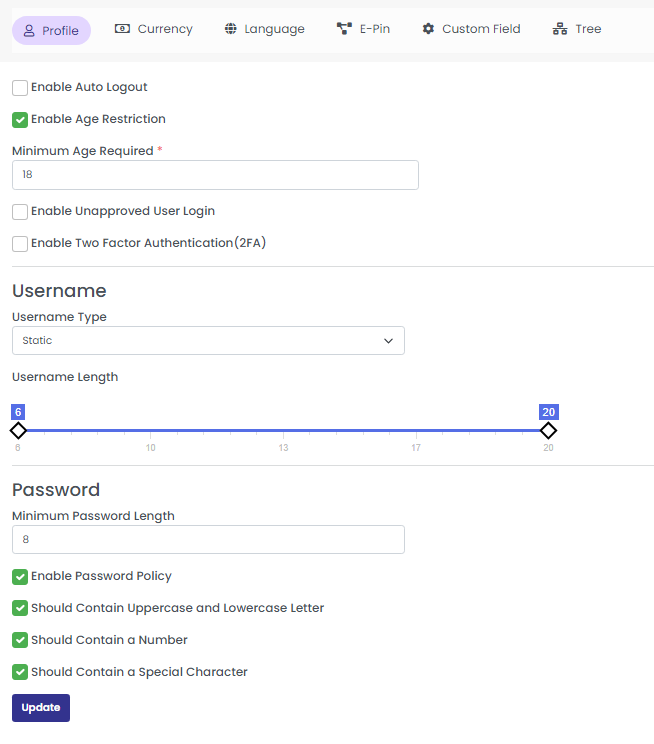
Under Profile, you can set the auto-logout feature, enable or disable Two Factor Authentication (2FA) using google authenticator, and enable age restriction. You can also set auto-generated usernames, and enable or disable strong password settings.

Update the following details to configure your profile by clicking the “profile tab’.

  1. Enable Auto Logout
  2. Enable Age Restriction
  3. Minimum Age Required
  4. Enable Unapproved User Login:
  5. Enable Two Factor Authentication (2FA)

Username

Username Type: Select username type (Static/Dynamic)

Username Length: Drag the marker to set the username length

Password

Set the length of the password, and enable the ‘Password Policy’ option to configure the password policy.

You can enable/disable:

  1. Uppercase and Lowercase Letter
  2. Number
  3. Special Character

Click on the update button to configure the profile settings.
2. Currency

Click on the Currency tab to configure the currency settings.

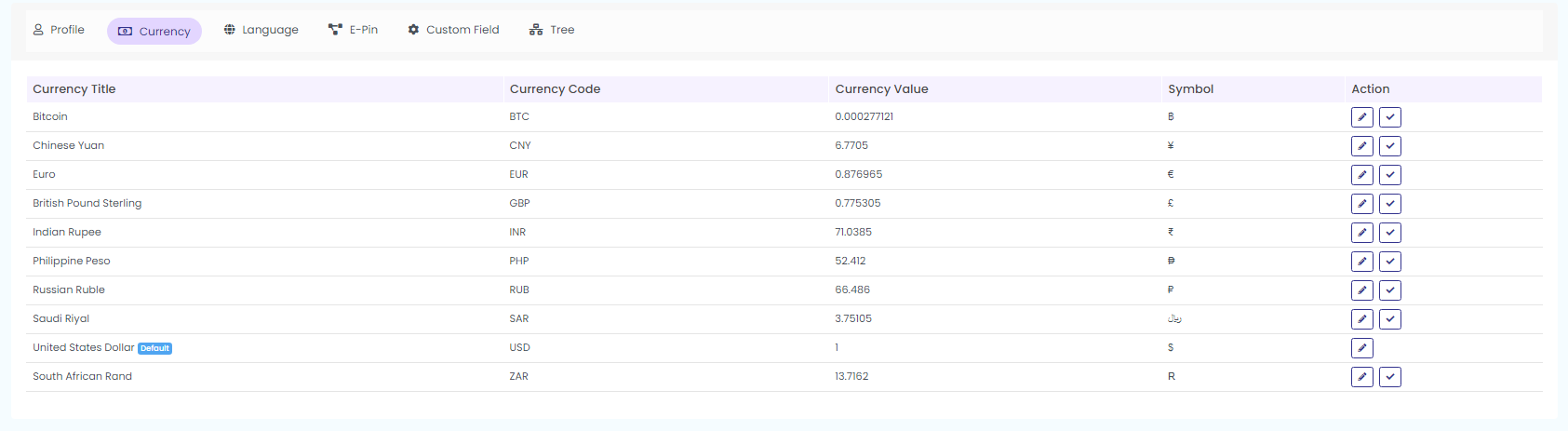
Here you can show all currencies in the system, can enable and disable currencies, and can change currency values. You can also set default system currency here.

Click on Active or blocked option to view the active/blocked currencies as shown in the below screenshot.

Click on the icons in the action field as shown in the above screenshot to set the default currency and to edit the currency details.

You can see the following details when you click the ‘currency section’

  1. Currency Title
  2. Currency Code
  3. Currency Value
  4. Symbol
  5. Action

Click on the edit icon under action to edit currency.

Set as Default

Click on the icon next to the edit icon, to set the particular currency as the default currency

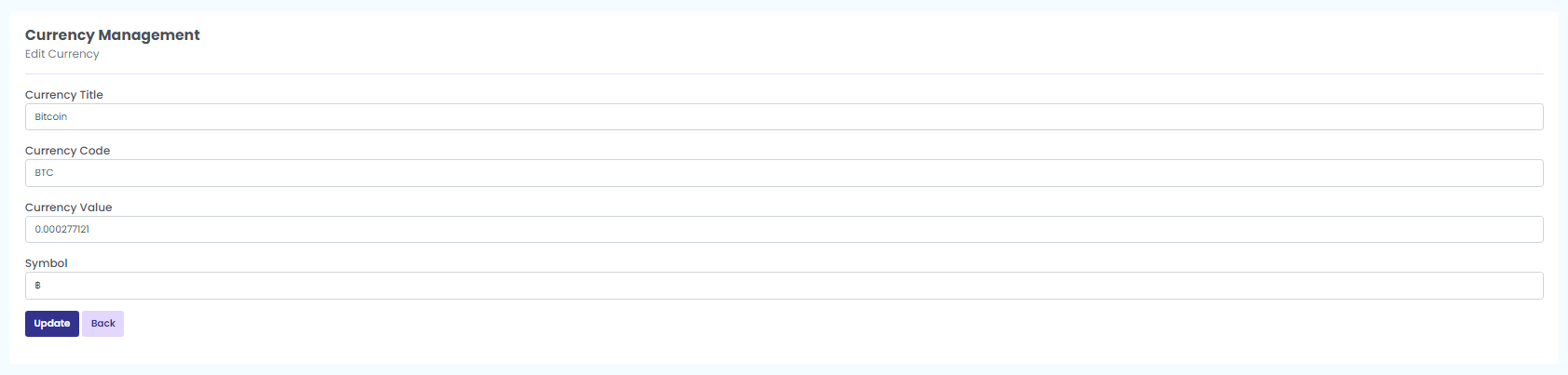
Edit

Click on this Edit icon to activate or inactivate the currency. Enter the following details

Currency Title, Currency code, Currency value, symbol and click on update to save the edits you have made. Then, ‘currency updated successfully’ message pops up.
3. Language

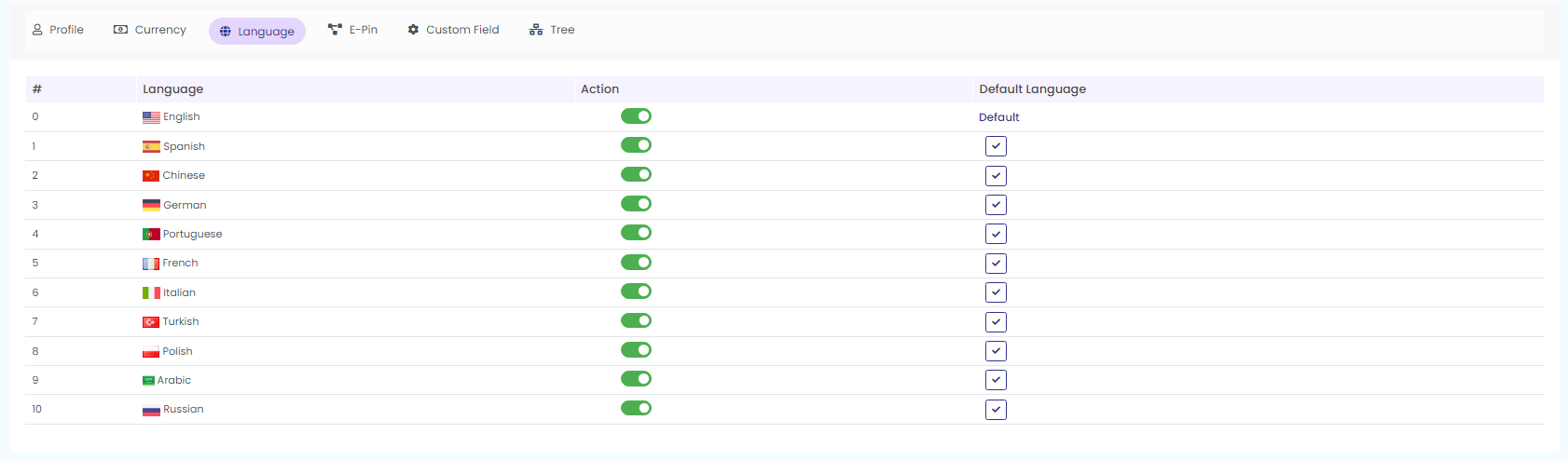
Here you can show all languages in the system, can enable and disable languages, and can set default system languages.

You can enable or disable languages under the section ‘Action’. Enable the action button and set the specific language as default language.
4. E-Pin

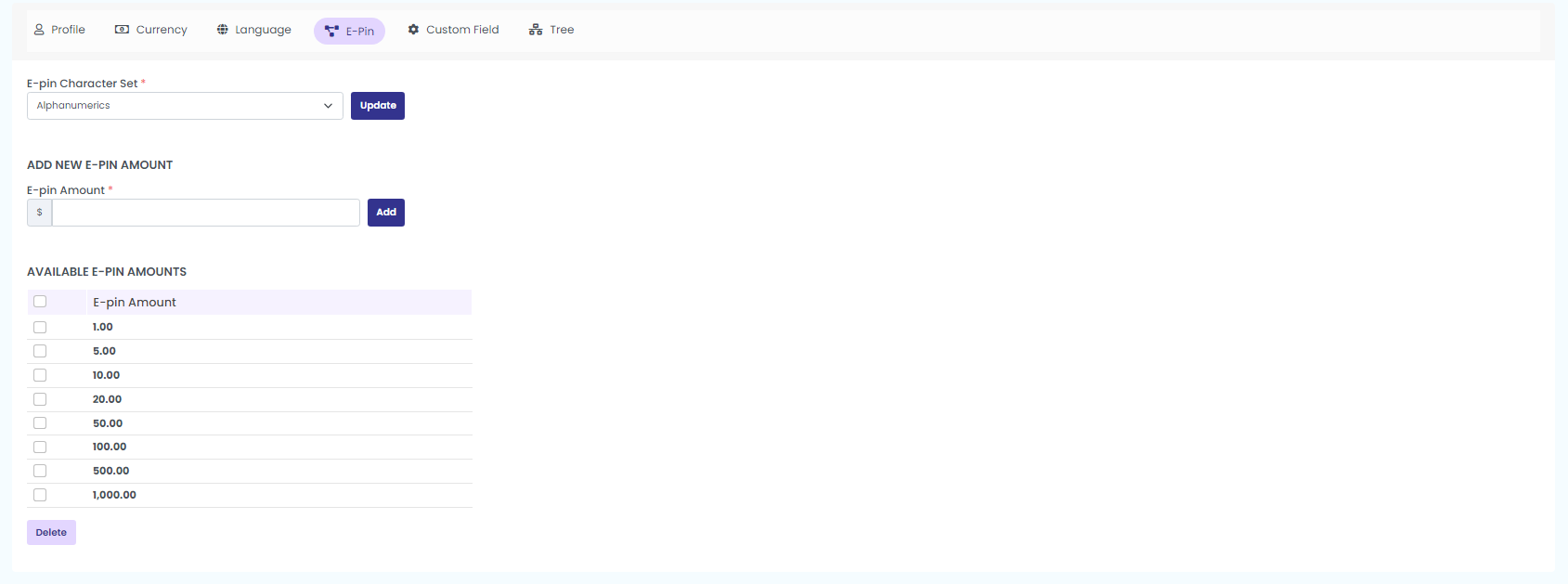
Here you can configure the E-pin character set, can add a new E-pin amount, and can remove an E-pin amount.

Click on the E-Pin tab to configure E-Pin settings and add a new E-Pin amount in the system.

E-Pin Configuration

In order to configure E-pin, enter the following details:

Set the E-Pin character format as either:

  1. Alphabets
  2. Numerals
  3. Alphanumerals

Click on the update button to configure the E-Pin.

Now, Add New E-Pin Amount

After entering the amount click on the ‘Add button’ to add the new E-Pin amount.

Available E-Pin Amount

You can view the available E-pin amounts here. The new Epin will be added under this list. You can also Delete any available Epin by selecting the respective e pins, and clicking on the ‘delete’ button.
5. Custom Field

This is the sign up form field

Edit fields like, Name, Type, Sort Order, Enabled, Mandatory

Click on the ‘update’ button to save the changes.
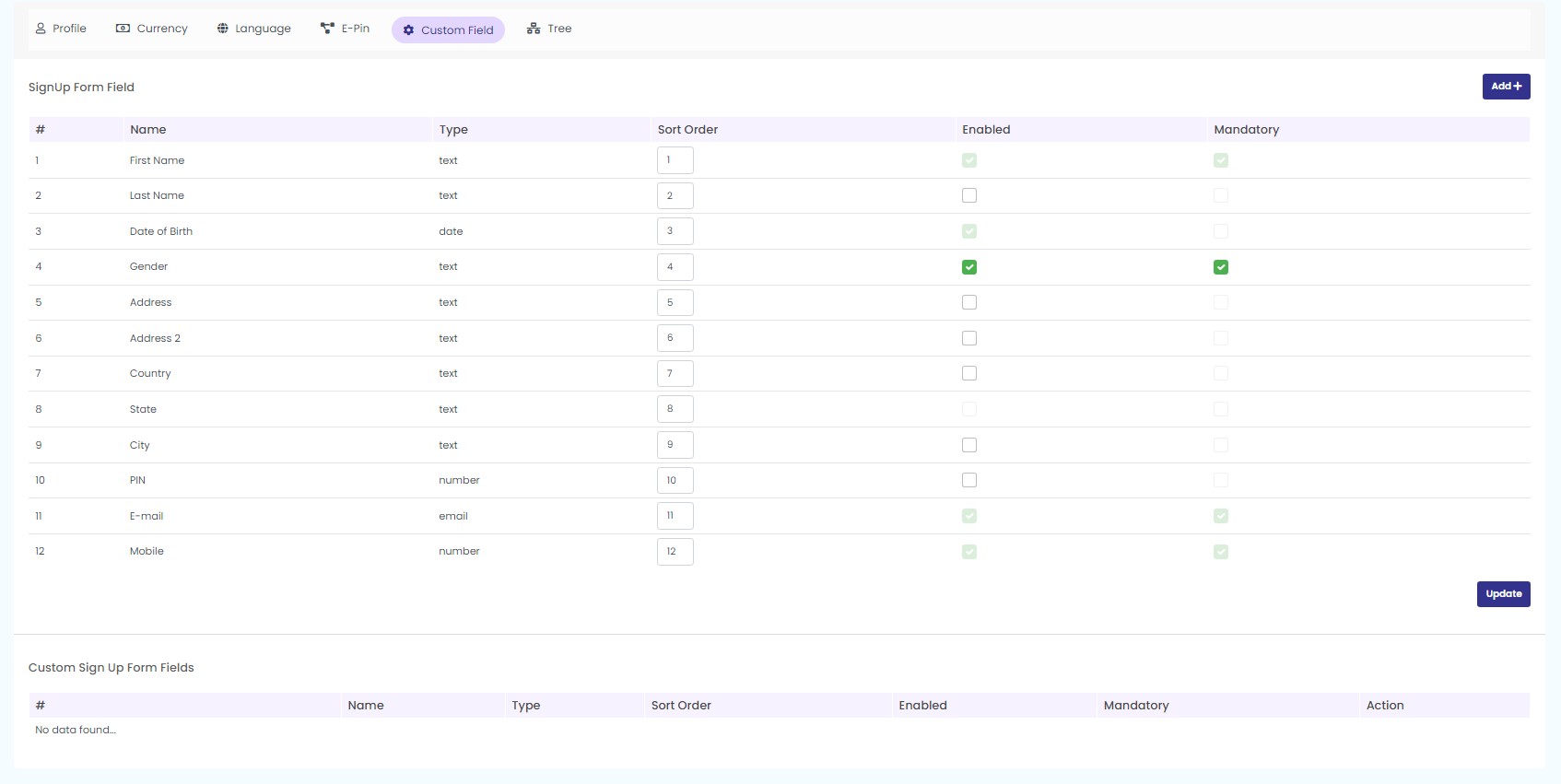
To add a new sign up form, click on the “Add” button from the top right corner.
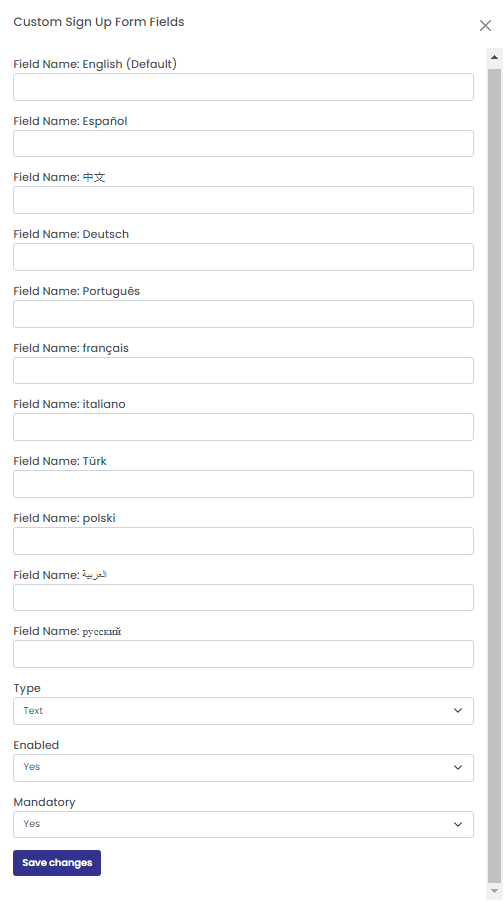
Fill in the necessary fields from the arrived pop up. Clock on ‘save changes’ option to add a new custom field.

6. Tree

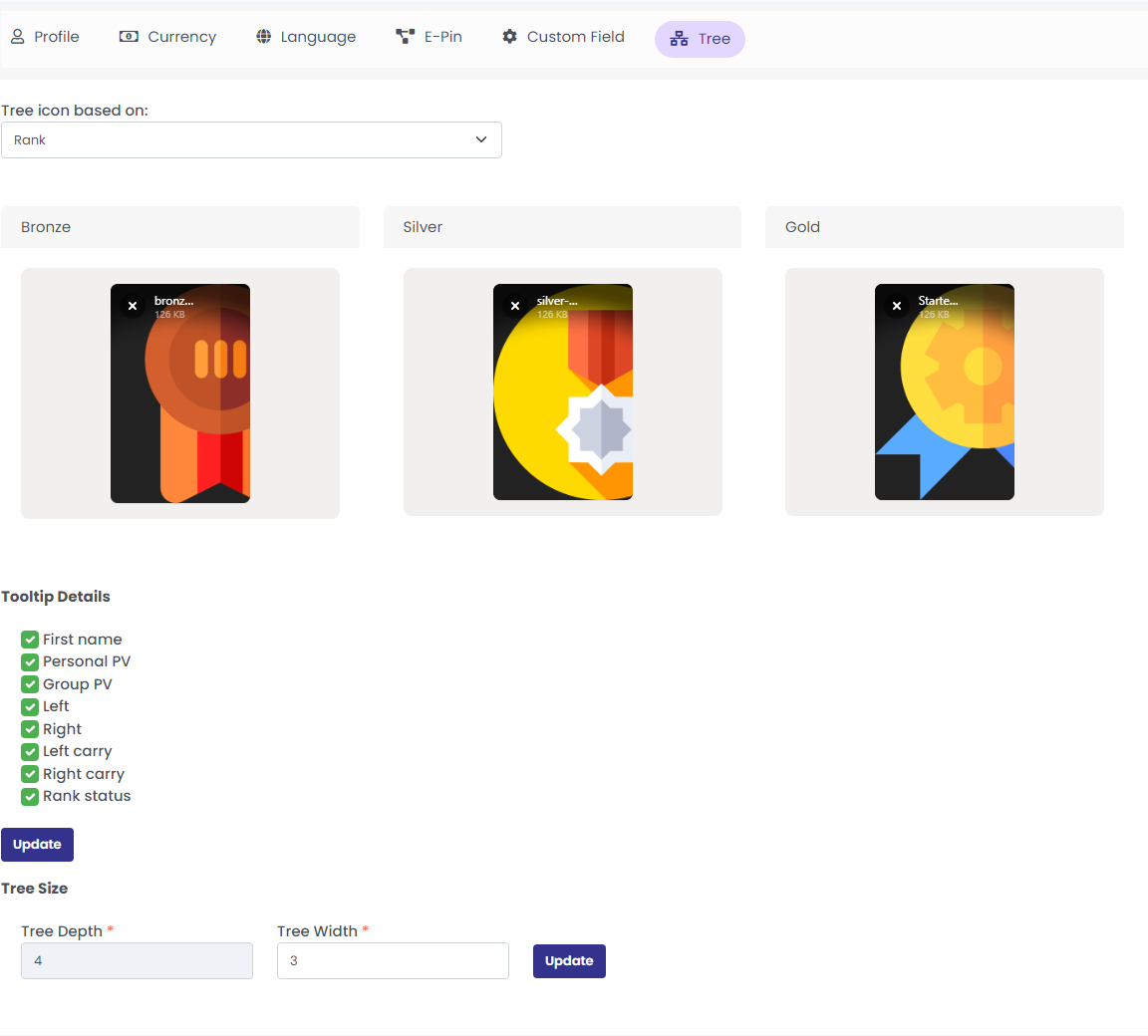
Click on the ‘Tree tab’ to configure the Tree settings.

Here you can set what icon to show in the tree. You can show icons based on the profile picture, based on member status (active/inactive), or based on membership package or rank. You can also configure what to show in the tree tooltip.

Fill in the necessary details like:

Tree Icon Based On: Select the any of the options (Member Status /Profile Image/Membership Pack/Rank) from the drop down to configure the tree icon

Tooltip Details : Enable the options to be displayed in the tree tooltip.

After selecting the options click on the Update button to configure the tree settings.

Tree size

Set the tree depth and width and click on the ‘update’ button.

Related Articles

  • How To View The Activities Of The Users?

  • How to Configure Commission History?

  • How to Manage Commission Plans Using Commission Settings?

  • What are the different settings available in Infinite MLM?

  • How Is The Company Details Configured?

MLM Software Dashboard

Try Free MLM Demo

Try Now

© Copyright 2026 by Infinite Open Source Solutions LLP All Rights Reserved.

Diese Website verwendet Browser-Cookies, um Ihr Nutzererlebnis zu verbessern und die Ladezeiten zu beschleunigen. Wir speichern jedoch keine Ihrer persönlichen Daten. Durch die weitere Nutzung akzeptieren Sie unsere Datenschutzrichtlinie.

Cookie-Richtlinie