Infinite MLM Software Logo
  • Produkte
    Produkte
    Binäre MLM-Software Ausgewogenes Wachstum durch zwei Downlines
    Board MLM-Software Ermöglicht Rotation und Wiedereintritt von Mitgliedern
    Matrix MLM-Software Geordnetes Wachstum durch begrenzte Teamstruktur
    Monoline MLM-Software Reiht Mitglieder in einer Linie für gleiche Vorteile auf
    Unilevel MLM-Software Ermöglicht unbegrenzte Direktrekrutierungen
    Direktvertriebs-Software Vereinfacht Aufgaben und Abläufe im Direktvertrieb
    MLM-Services
    MLM-MigrationÜbertragen Sie Ihre Daten auf eine neue MLM-Plattform
    Drittanbieter-IntegrationVerbindung mit externen Tools und Diensten
    Shopify-IntegrationSynchronisiert MLM-Software mit Ihrem Shopify-Shop
    Demo dashboard preview

    Enterprise-Klasse · KI-gestützt

    Infinite MLM Software

    Fortschrittliche Technologie, intelligente Automatisierung und smarte Funktionen — alles auf einer Plattform.

    Kostenlose Demo testen
  • Demo
    Individuelle Demo
    Custom Demo preview

    Die individuelle MLM-Software-Demo bietet ein personalisiertes Erlebnis, zugeschnitten auf Ihre Geschäftsbedürfnisse.

    Jetzt testen
    Vordefinierte Demo
    Preset Demo preview

    Die vordefinierte Demo zeigt eine standardisierte Ansicht der Software mit voreingestellten Beispieldaten.

    Jetzt testen
    1 Million Users
    MLM-Demo mit 1 Million Nutzern
    • 1 Million Nutzer verwalten
    • Binärer Matching-Bonus
    • Deckelungs- / Cap-Einstellungen
    • Spillover-Binär-Einstellungen
    Admin-Demo Nutzer-Demo
  • MLM-Pläne
    MLM-Pläne
    Binärer MLM-Plan Baut eine zweibeinige Downline-Struktur auf
    Matrix MLM-Plan Begrenzt Breite und Tiefe der Downlines
    Unilevel MLM-Plan Ermöglicht unbegrenzt viele Direktrekrutierungen auf der ersten Ebene
    Board MLM-Plan Mitglieder steigen über eine Matrix auf
    Monoline MLM-Plan Vertriebspartner werden in einer geraden Downline platziert
    Party Plan MLM Fokus auf Verkäufe über gesellschaftliche Veranstaltungen
    Generation MLM-Plan Provisionen über mehrere Ebenen hinweg
    Hybrid-MLM-Plan Direkte Empfehlungen werden vom Sponsor auf einer der beiden Seiten platziert
    Stair Step Plan Rangbasiertes Breakaway-System
    Alle Pläne anzeigen →
    MLM Plans overview

    Vergleichen und Auswählen

    Gewinnen, Belohnen, Binden: Die besten MLM-Pläne für Ihren Erfolg

    Vergleichen Sie Vergütungsstrukturen und wählen Sie den perfekten Plan für Ihr Unternehmen.

    Pläne anzeigen
  • Preise
  • Ressourcen
    Unternehmen
    Über unsUnsere Mission, Werte und Geschichte
    ReferenzenKundenbewertungen und Feedback
    AnwendungsfallBeispiele aus der Praxis für die Produktnutzung
    FAQHäufige Fragen mit Antworten
    Entdecken
    BlogRegelmäßige Artikel und Updates
    Video-TutorialsVisuelle Anleitungen für leichtes Lernen
    DokumentationNutzerhandbücher und Anleitungen
    VersionshistorieProtokoll der Software-Updates
    FunktionenWichtige Werkzeuge und Funktionen
    ErfolgsgeschichtenKundenerfolge mit unserer Lösung
    MLM-ErweiterungenErweiterte Module für mehr Funktionsumfang
    MLM-RechnerEinfache plan-basierte Provisionsberechnungen
    Contact our experts

    Wir helfen Ihnen gerne

    Sprechen Sie mit unseren Experten

    Von Produktdemos bis zu individuellen Lösungen — wir unterstützen Ihren Erfolg.

    Kontakt aufnehmen
Live-Demo Kostenlos starten
Jetzt starten
MLM HELP

What Does a CRM Dashboard Track and Analyze?

/ CRM / What Does a CRM Dashboard Track and Analyze?
  • May 29, 2026
  • infinite_help
  • CRM

Click on Dashboard sub menu to view the total ongoing, accepted, rejected leads. It also displays your current follow up, missed follow up, recent lead information details.
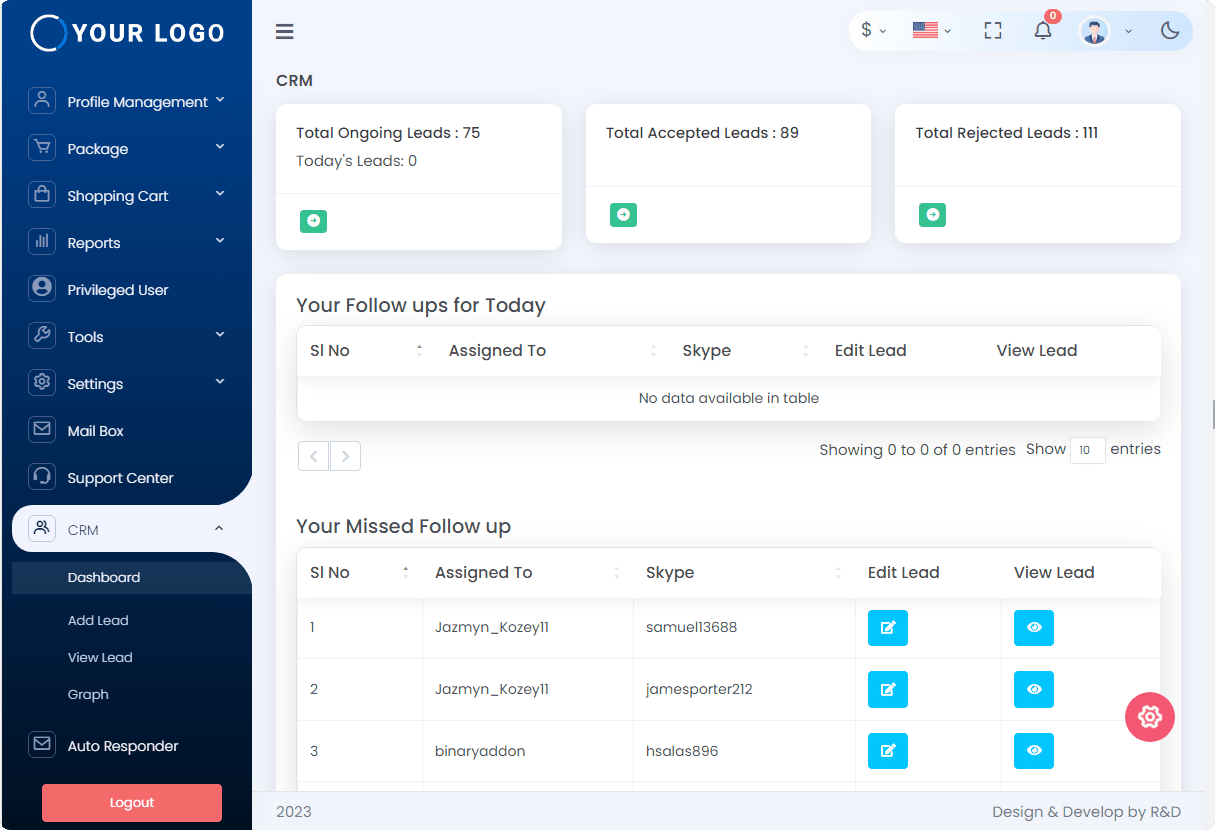
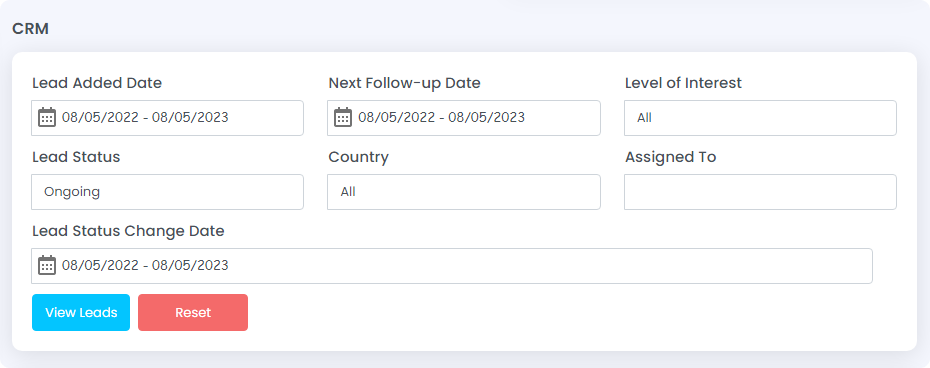
To get detailed reports of the leads click on the icon shown in the screenshot and update the necessary:

  • Lead Added Date
  • Next Follow-up Date
  • Level of Interest
  • Lead Status
  • Country
  • Assigned To
  • Lead Status Change Date

Then, click on the ‘view’ button to see the complete details.
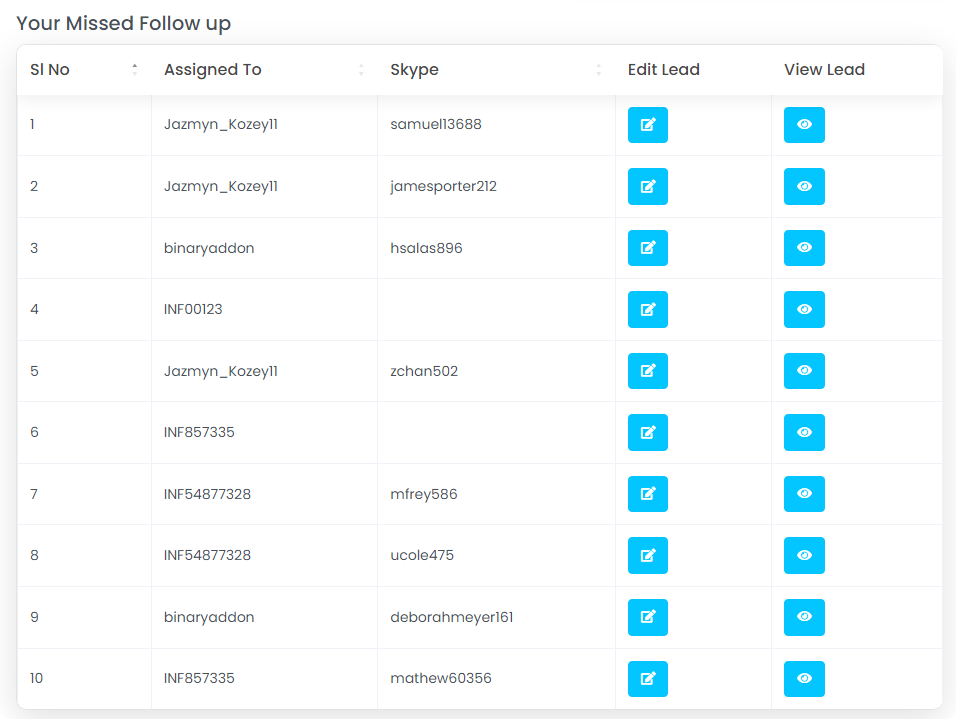
Missed Follow Up: Assigned to and Skype ID. You can also edit and view the details of the leads by clicking on respective icons.
Recent Leads: This shows name, Skype ID, lead completeness, follow up leads, next follow up date. There is also an option to edit and view the leads.
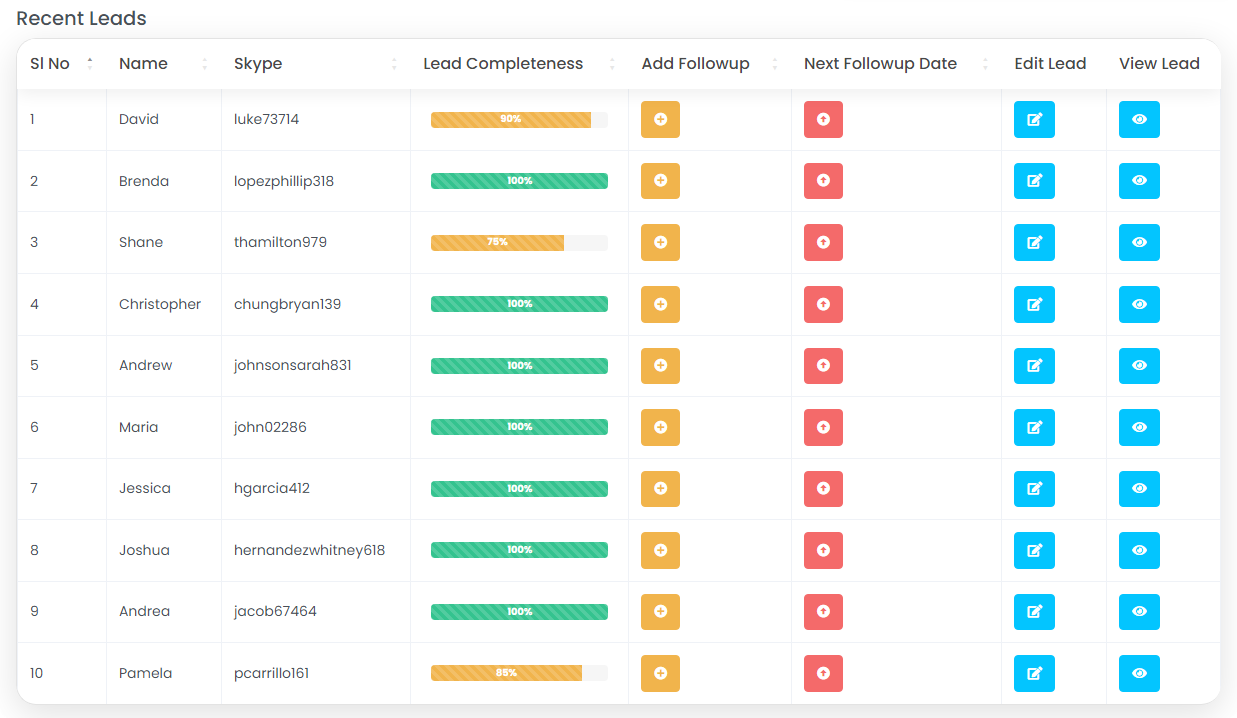
There are four icons under following fields:

  • Edit Lead
  • Add follow-up
  • Next follow-up date
  • View lead

Edit Lead

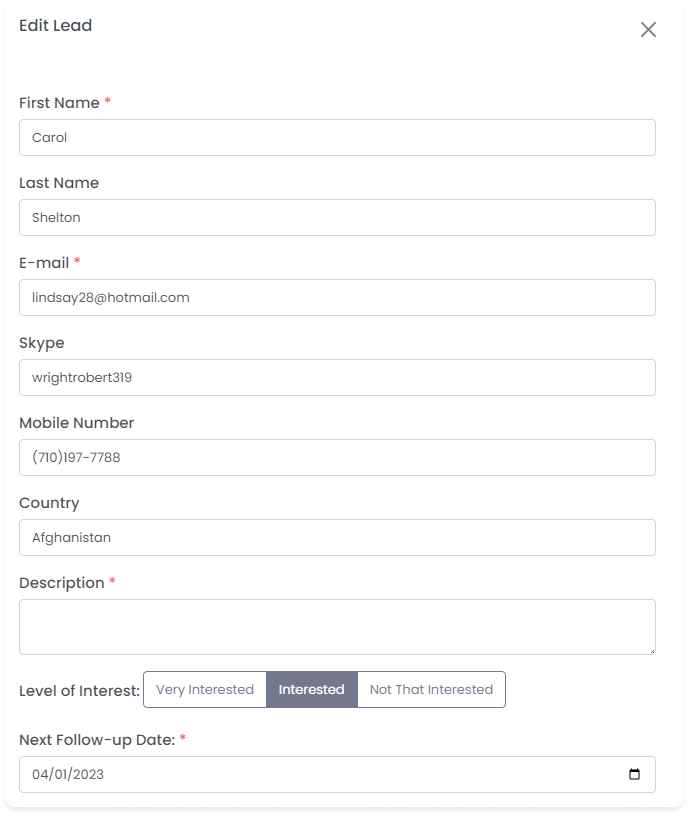
Click on Edit Lead icon to edit the lead information as shown in the below screenshot.

Edit the following details of the lead:

  • First Name: Edit the first name of the lead
  • Last Name: Edit the last name of the lead
  • Email id: Edit the email id
  • Skype ID: Edit the Skype id.
  • Mobile No: Edit the mobile number
  • Country: Edit the country details
  • Description: Edit the description
  • Edit the level of interest and lead status
  • Next follow up date: Enter the follow up date
  • Lead status: Update the lead status

After editing the details, click on the submit button to edit the lead information and the message “Lead updated successfully” gets popped up.

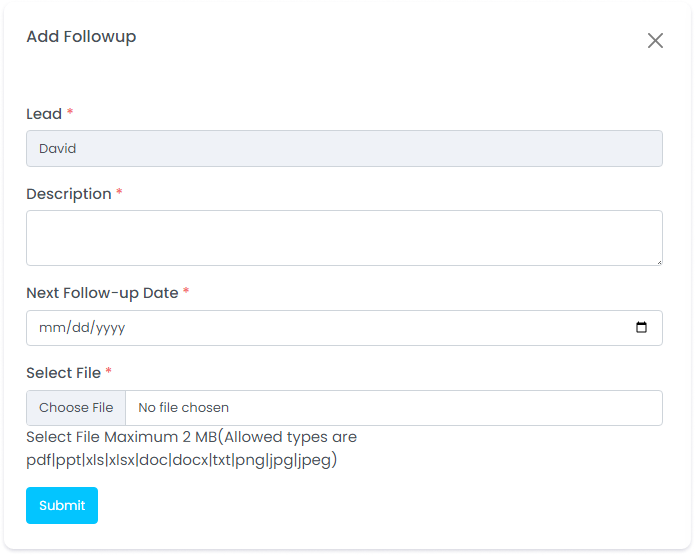
Add followup

Click on Add follow up icon to add follow up details.

Add the following details:

  • Lead: Enter the lead name
  • Description: Enter the description
  • Next follow up date: Select the next follow up date

Click on Choose file to upload any file of 2MB.

After entering the details, click on the ‘submit’ button to add followup details and the message “Followup added successfully” gets popped up.
Next followup date

Click on Next followup date icon as shown in the below screenshot.

Update the next followup date.

After entering the date, click on Update followup date button to update the date and the message “Followup date update successfully”.

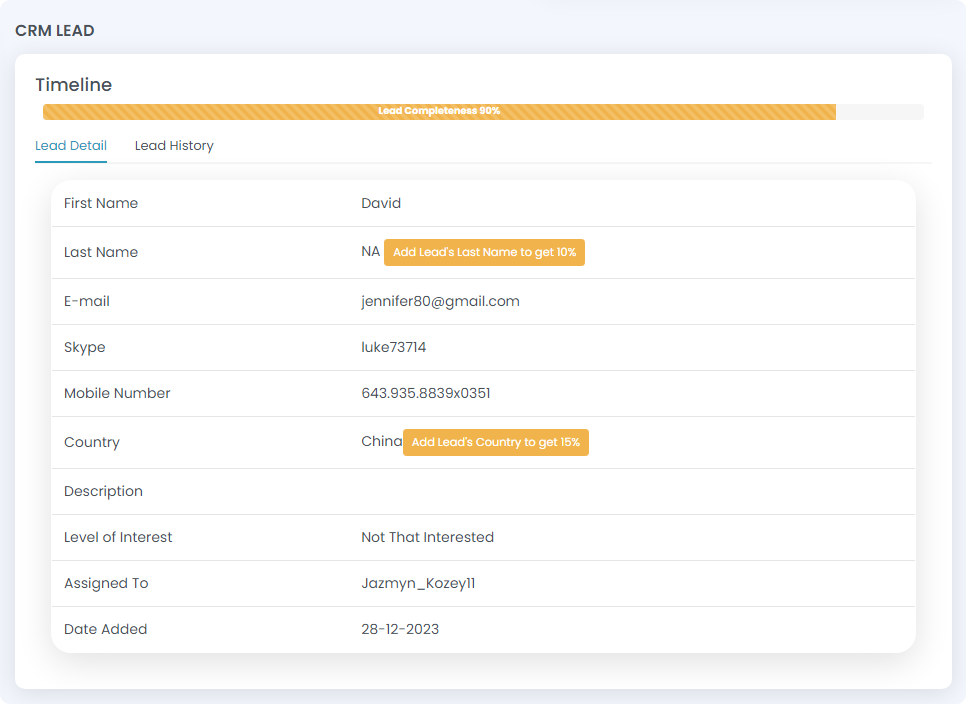
View lead

Click on the View lead icon to view the lead information.

When clicked, Lead Details and Lead History can be viewed.

Related Articles

  • What does the lead graph displays?

  • How to view lead information ?

  • How to add leads?

  • What Does a CRM Dashboard Track and Analyze?

  • What does the lead graph display in the user side?

MLM Software Dashboard

Try Free MLM Demo

Try Now

© Copyright 2026 by Infinite Open Source Solutions LLP All Rights Reserved.

Diese Website verwendet Browser-Cookies, um Ihr Nutzererlebnis zu verbessern und die Ladezeiten zu beschleunigen. Wir speichern jedoch keine Ihrer persönlichen Daten. Durch die weitere Nutzung akzeptieren Sie unsere Datenschutzrichtlinie.

Cookie-Richtlinie