Infinite MLM Software Logo
  • Produkte
    Produkte
    Binäre MLM-Software Ausgewogenes Wachstum durch zwei Downlines
    Board MLM-Software Ermöglicht Rotation und Wiedereintritt von Mitgliedern
    Matrix MLM-Software Geordnetes Wachstum durch begrenzte Teamstruktur
    Monoline MLM-Software Reiht Mitglieder in einer Linie für gleiche Vorteile auf
    Unilevel MLM-Software Ermöglicht unbegrenzte Direktrekrutierungen
    Direktvertriebs-Software Vereinfacht Aufgaben und Abläufe im Direktvertrieb
    MLM-Services
    MLM-MigrationÜbertragen Sie Ihre Daten auf eine neue MLM-Plattform
    Drittanbieter-IntegrationVerbindung mit externen Tools und Diensten
    Shopify-IntegrationSynchronisiert MLM-Software mit Ihrem Shopify-Shop
    Demo dashboard preview

    Enterprise-Klasse · KI-gestützt

    Infinite MLM Software

    Fortschrittliche Technologie, intelligente Automatisierung und smarte Funktionen — alles auf einer Plattform.

    Kostenlose Demo testen
  • Demo
    Individuelle Demo
    Custom Demo preview

    Die individuelle MLM-Software-Demo bietet ein personalisiertes Erlebnis, zugeschnitten auf Ihre Geschäftsbedürfnisse.

    Jetzt testen
    Vordefinierte Demo
    Preset Demo preview

    Die vordefinierte Demo zeigt eine standardisierte Ansicht der Software mit voreingestellten Beispieldaten.

    Jetzt testen
    1 Million Users
    MLM-Demo mit 1 Million Nutzern
    • 1 Million Nutzer verwalten
    • Binärer Matching-Bonus
    • Deckelungs- / Cap-Einstellungen
    • Spillover-Binär-Einstellungen
    Admin-Demo Nutzer-Demo
  • MLM-Pläne
    MLM-Pläne
    Binärer MLM-Plan Baut eine zweibeinige Downline-Struktur auf
    Matrix MLM-Plan Begrenzt Breite und Tiefe der Downlines
    Unilevel MLM-Plan Ermöglicht unbegrenzt viele Direktrekrutierungen auf der ersten Ebene
    Board MLM-Plan Mitglieder steigen über eine Matrix auf
    Monoline MLM-Plan Vertriebspartner werden in einer geraden Downline platziert
    Party Plan MLM Fokus auf Verkäufe über gesellschaftliche Veranstaltungen
    Generation MLM-Plan Provisionen über mehrere Ebenen hinweg
    Hybrid-MLM-Plan Direkte Empfehlungen werden vom Sponsor auf einer der beiden Seiten platziert
    Stair Step Plan Rangbasiertes Breakaway-System
    Alle Pläne anzeigen →
    MLM Plans overview

    Vergleichen und Auswählen

    Gewinnen, Belohnen, Binden: Die besten MLM-Pläne für Ihren Erfolg

    Vergleichen Sie Vergütungsstrukturen und wählen Sie den perfekten Plan für Ihr Unternehmen.

    Pläne anzeigen
  • Preise
  • Ressourcen
    Unternehmen
    Über unsUnsere Mission, Werte und Geschichte
    ReferenzenKundenbewertungen und Feedback
    AnwendungsfallBeispiele aus der Praxis für die Produktnutzung
    FAQHäufige Fragen mit Antworten
    Entdecken
    BlogRegelmäßige Artikel und Updates
    Video-TutorialsVisuelle Anleitungen für leichtes Lernen
    DokumentationNutzerhandbücher und Anleitungen
    VersionshistorieProtokoll der Software-Updates
    FunktionenWichtige Werkzeuge und Funktionen
    ErfolgsgeschichtenKundenerfolge mit unserer Lösung
    MLM-ErweiterungenErweiterte Module für mehr Funktionsumfang
    MLM-RechnerEinfache plan-basierte Provisionsberechnungen
    Contact our experts

    Wir helfen Ihnen gerne

    Sprechen Sie mit unseren Experten

    Von Produktdemos bis zu individuellen Lösungen — wir unterstützen Ihren Erfolg.

    Kontakt aufnehmen
Live-Demo Kostenlos starten
Jetzt starten
MLM HELP

How to View Leads in MLM Software?

/ Tools / How to View Leads in MLM Software?
  • May 29, 2026
  • infinite_help
  • Tools

Managing leads effectively is essential for tracking potential customers and monitoring distributor engagement. The Leads section in your MLM software gives you a centralized view of all prospects and their current status.

Step 1: Navigate to the Leads Section

  • Log in to your MLM software dashboard.
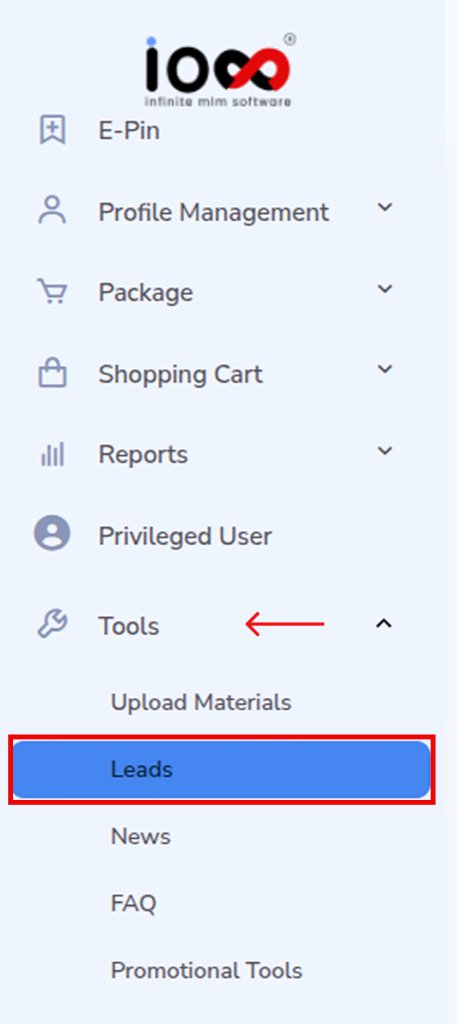
  • On the left-side navigation panel, locate and click on Tools.
  • From the dropdown menu, select Leads.

This will take you to the Leads management interface where all lead-related data is stored.
Step 2: Access the Leads Dashboard

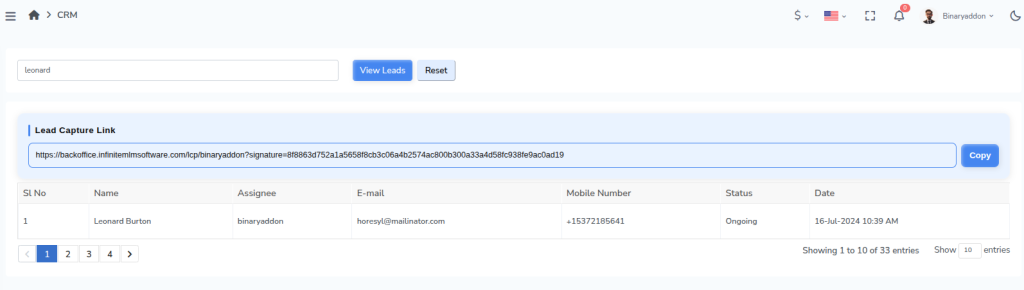
  • Once the Leads page opens, you will see a structured table listing all leads.
  • This dashboard acts as your control center, allowing you to monitor, manage, and review every lead generated in the system.
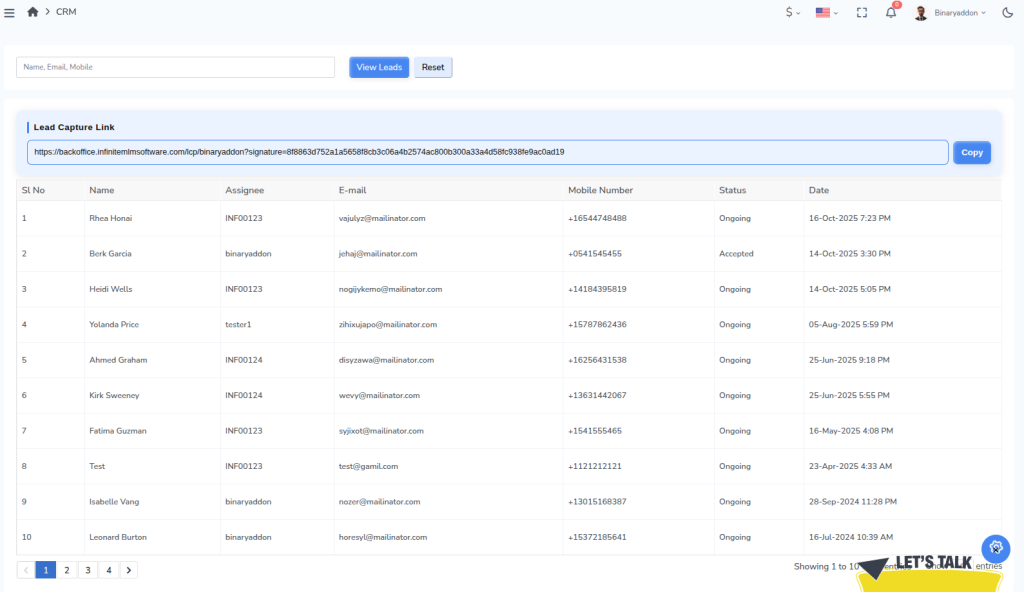
There you can view and copy Lead Capture Link, a unique URL that collects prospect details and automatically records them as leads in the MLM system under the assigned distributor.

Step 3: Understand the Lead Table

Each row in the table represents a lead, along with key details that help you track and manage follow-ups efficiently:

  • Lead Name – Identifies the prospect or potential customer.

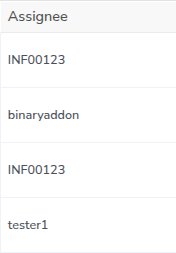
Assignee – Shows the distributor or team member responsible for handling the lead.
Email ID – Helps in initiating email communication and follow-ups.
Phone Number – Useful for direct contact and conversions.
Status (Accepted / Ongoing) – Indicates the current stage of the lead in the pipeline.

Date & Time – Displays when the lead was created or last updated, helping you track activity timelines.

Step 4: Search for a Specific Lead

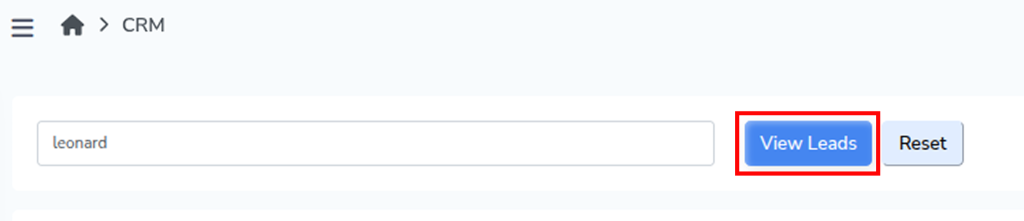
  • Use the search bar available on the Leads page.
  • Enter the name of the lead you want to locate.
  • Click on the View Leads button.

The system will filter and display the relevant lead details, allowing you to quickly access specific information without scrolling through the entire list.
Step 5: Reset the Search Results

  • After viewing a specific lead, click on the Reset button.
  • This will clear the search input and restore the complete list of leads.

Note: Regularly reviewing the Leads section helps you stay updated on lead progress, identify pending follow-ups, and improve conversion rates by acting on leads at the right time.

Related Articles

  • How to Set Social Invites in MLM Software?

  • How to Set Banner Invites in MLM Software?

  • How to Set Text Invites in MLM Software?

  • How to Add FAQs in MLM Software?

  • How to Add Autoresponders in MLM Software?

MLM Software Dashboard

Try Free MLM Demo

Try Now

© Copyright 2026 by Infinite Open Source Solutions LLP All Rights Reserved.

Diese Website verwendet Browser-Cookies, um Ihr Nutzererlebnis zu verbessern und die Ladezeiten zu beschleunigen. Wir speichern jedoch keine Ihrer persönlichen Daten. Durch die weitere Nutzung akzeptieren Sie unsere Datenschutzrichtlinie.

Cookie-Richtlinie